Compare Figma And Paper With Visual Workflow Diagrams
guide2026-06-067 min read
Compare design products by showing where their capabilities overlap and where their workflows force different handoffs.
figmapaperdesign-workflowvisual-notes
Summary
Figma and Paper both sit in the product-design world, but their strongest claims point in different directions. Figma is the mature collaborative design suite; Paper is the code-native design canvas aimed at reducing the gap between design, web primitives, and agent-assisted implementation. The useful comparison is therefore not a feature checklist. It is a workflow map: where does the canvas live, who can act on it, and how much translation remains before something becomes production UI?What This Solves
A product comparison often collapses into a table of features. That is easy to scan, but it hides the decision that matters: what workflow does the product make easier? For Figma and Paper, the core distinction is this:- Figma is strongest as a shared design system, review, prototyping, and handoff environment.
- Paper is strongest as a web-standards canvas where design, code, real content, and agents stay closer together.
Who This Is For
This is for designers, design engineers, product builders, and AI workflow operators who need to decide which design surface belongs in a workflow. It is especially useful when the question is not “Which tool is better?” but:- Which tool should be the source of product intent?
- Which tool should be used for implementation exploration?
- Where should agents, code, and design systems interact?
- Where does the team want review and approval to happen?
In this note, “Paper” means the design product at
paper.design, not an arbitrary webpage. If the comparison target is a specific live page, the same diagram method still applies, but the evidence should come from that page instead.Prerequisites
- A clear definition of the two products being compared
- Current product sources, preferably official pages
- A separation between feature claims and workflow claims
- A drawing format that can show relationships, not only labels
- A place to publish or archive the visual result
- Figma Design:
https://www.figma.com/design/ - Figma Dev Mode:
https://www.figma.com/dev-mode/ - Figma Sites:
https://www.figma.com/sites/ - Figma Make:
https://www.figma.com/make/ - Paper homepage:
https://paper.design/ - Paper vs Figma:
https://paper.design/compare/figma
The Workflow
State the comparison assumption
Start by clarifying the object being compared. Here, the ambiguous phrase “the page” was treated as Paper, the design product. Without this assumption, a diagram could compare the wrong thing.
Collect product claims from current sources
Use current sources before drawing. Figma’s public pages emphasize design, collaboration, workflow, Dev Mode, Sites, and Make. Paper’s comparison page emphasizes a code-native HTML/CSS canvas, MCP integration, visual effects, and agent workflows.
Separate capability overlap from product gravity
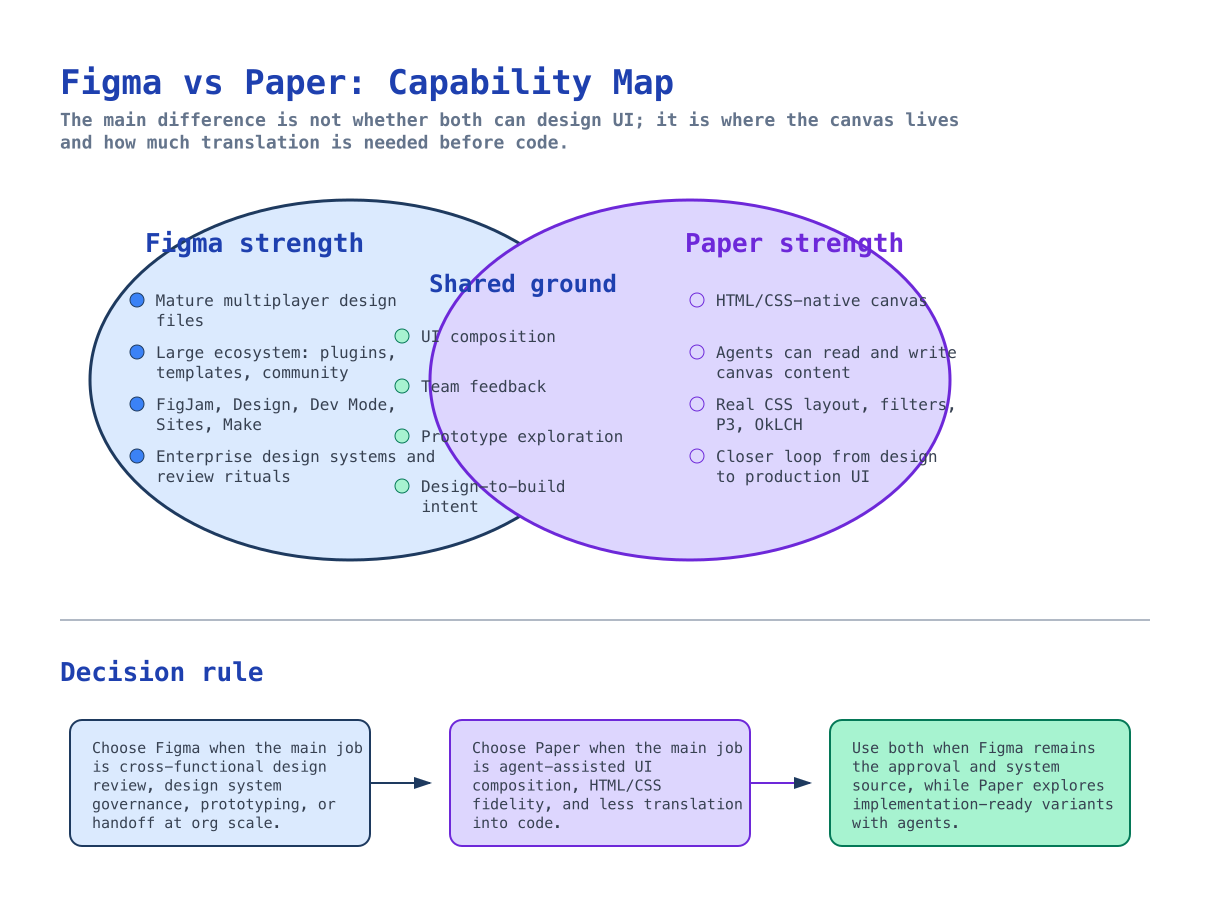
Both products can support UI composition and design-to-build intent. The difference is product gravity: Figma pulls work toward collaborative design governance, while Paper pulls work toward code-native implementation loops.
Draw the capability map first
Use overlapping regions instead of a table. The overlap region shows shared ground; the outer regions show where each product is more naturally differentiated.
Draw the workflow map second
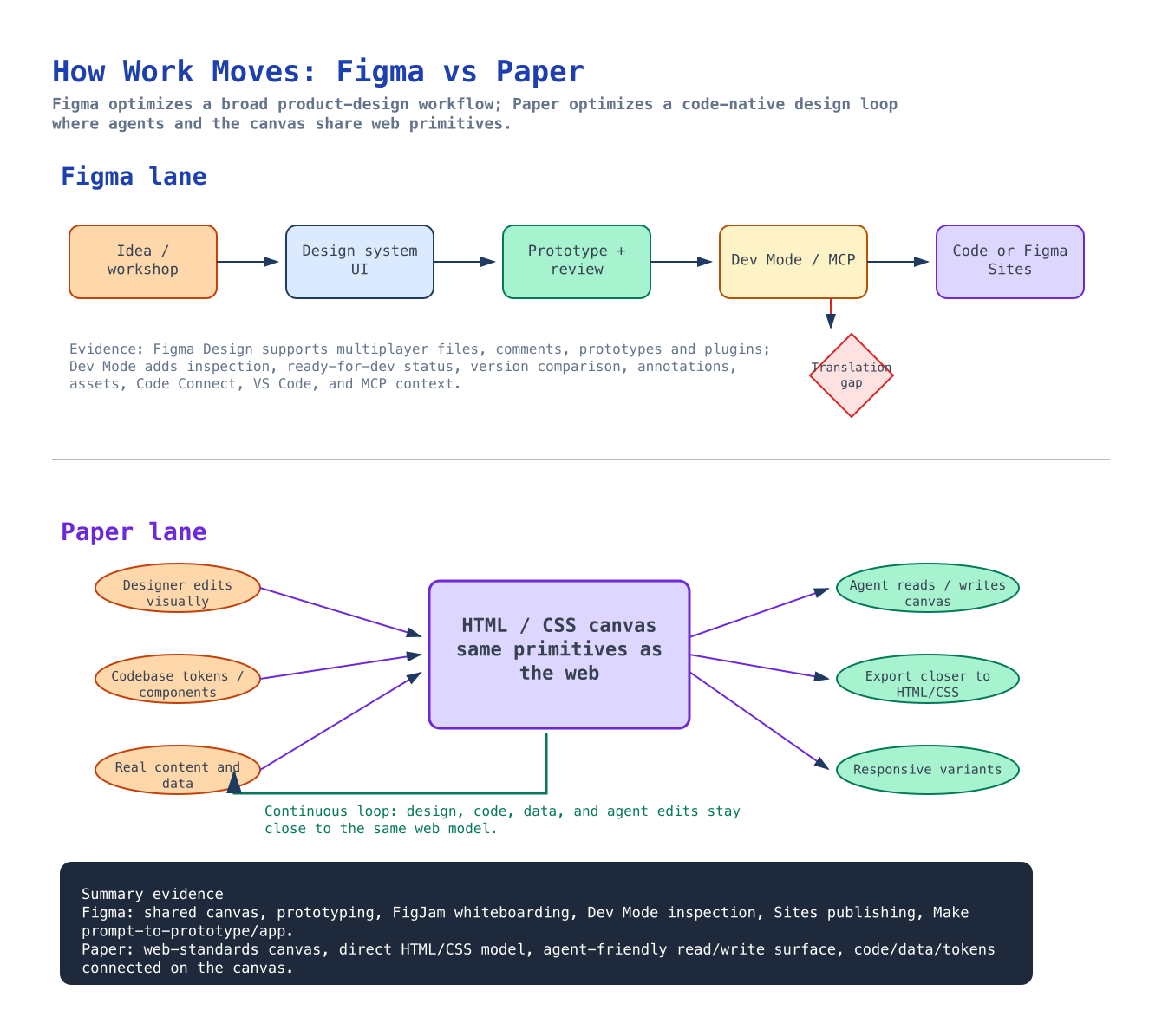
Use lanes and arrows to show how work moves. Figma’s lane runs from idea and design system work through review and handoff. Paper’s lane converges design edits, codebase tokens, and real content into an HTML/CSS canvas, then loops through agents and responsive variants.
Capability Reading
Figma’s differentiated strengths are maturity and breadth. It has a large ecosystem, multiplayer files, product-design collaboration patterns, FigJam, Dev Mode, Sites, Make, and enterprise design-system workflows. Paper’s differentiated strengths are its web-native design model and agent loop. Its product claim is that a canvas based on HTML and CSS reduces translation into code and gives agents a surface they can read and write more directly.Workflow Reading
Figma’s workflow is broad and organizational. It is well suited to workshops, design systems, prototyping, comments, review, and developer handoff. Its newer code-facing features reduce friction, but production implementation still often requires interpreting design intent into code. Paper’s workflow is narrower but more implementation-oriented. The central object is an HTML/CSS canvas. Design edits, codebase tokens, real content, responsive variants, and agents are all closer to the same web model. That distinction changes the decision:| Need | Better Default |
|---|---|
| Team review and design-system governance | Figma |
| Mature plugin and community ecosystem | Figma |
| Collaborative product-design source of truth | Figma |
| Agent-assisted UI exploration | Paper |
| HTML/CSS-native canvas behavior | Paper |
| Reducing design-to-code reinterpretation | Paper |
| Approval in one tool, implementation exploration in another | Both |
Common Failure Modes
Final Checklist
- The comparison target is unambiguous.
- Current sources were checked before drawing.
- Shared capabilities are separated from differentiated strengths.
- The diagram shows workflow movement, not only feature labels.
- The final decision rule tells a reader when to choose Figma, Paper, or both.
- The rendered diagrams are readable inside the published note.
What To Remember
Figma and Paper are not only two design tools; they represent two different workflow centers. Figma centers the team design process. Paper centers the web-native implementation loop. The durable comparison is: Figma is better when the organization needs design review, system governance, prototyping, and mature handoff; Paper is better when the team wants agents and code to work directly against a canvas that already behaves more like the web.Metadata
Quick Reference
Typeguide
Statuspublished
Date2026-06-06
Retrieval Tags
figmapaperdesign-workflowvisual-notes
Related
AI design workflowsDesign to code handoffVisual product comparisons